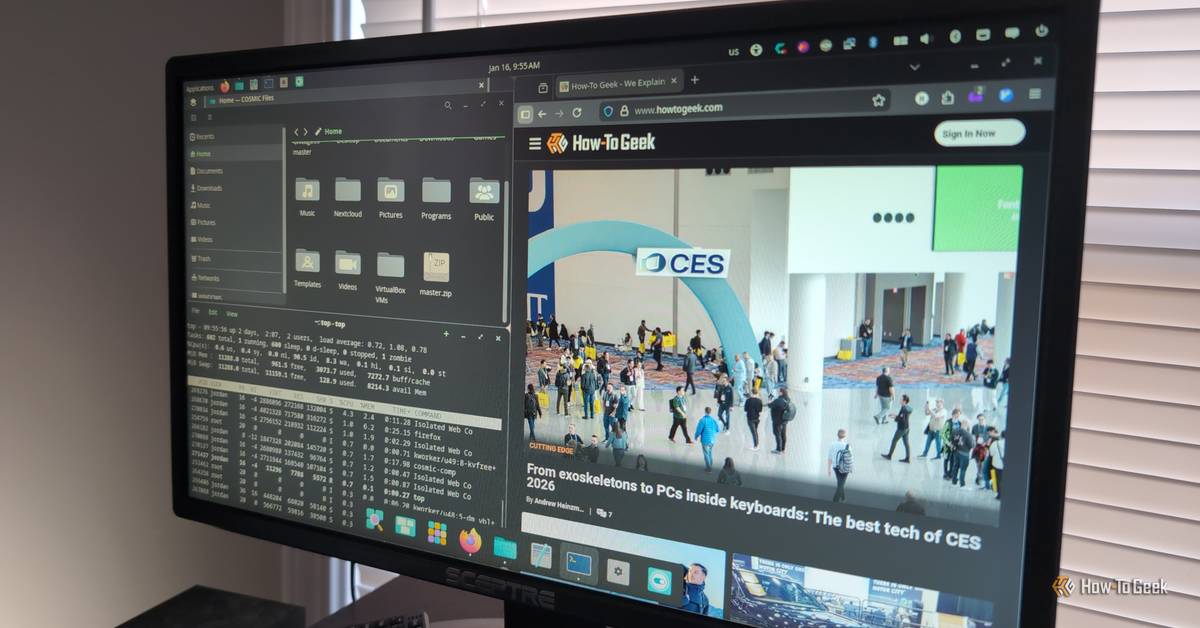
The promise of a new, Rust-native desktop environment from System76 has fueled significant anticipation within the Linux community. But for those considering an immediate transition, a critical evaluation reveals that COSMIC, in its current state, presents significant hurdles, undermining productivity and user experience for seasoned Linux users expecting a seamless workflow.
Key Takeaways:
-
COSMIC struggles with basic applet functionality, leading to missing icons and inaccessible applications.
-
Inconsistent context menu behavior frequently disrupts user interaction and workflow.
-
Critical applications, particularly popular terminal emulators, often fail to run, indicating compatibility challenges.
-
While innovative and customizable, the current version demands significant adaptation or replacement of core tools.
Setting Expectations: Acknowledging Bias and Test Environment
COSMIC, the Rust-written desktop environment from System76, has been a recurring subject in Linux discussions since its summer 2024 announcement. Developed by the Linux-first computer manufacturer behind Pop!_OS, COSMIC was conceived as an efficient, memory-safe replacement for the customized GNOME desktop Pop!_OS previously utilized. On paper, its potential is significant.
My foray into COSMIC, however, wasn't from a perfectly neutral standpoint. As a long-time Linux user, I confess a general dislike for GNOME, and COSMIC's design borrows heavily from it. My hope was that COSMIC might succeed where GNOME failed: by drawing me into a truly enjoyable Linux desktop experience. Furthermore, my testing environment wasn't the purest: I installed COSMIC on my CachyOS system, not the System76-optimized Pop!_OS. While this introduces a variable, I replicated key issues in a Pop!_OS virtual machine to ensure they weren't isolated to my specific setup.
The Applet Abyss: Missing Icons and Broken Trays
One of the most immediate and frustrating issues I encountered was the inconsistent behavior of applet icons. While some daily applications successfully appeared in COSMIC's panel applet menu, others simply did not. Vesktop, my primary Discord client, was a prime example; it vanished entirely from the panel. This became a significant problem when minimizing Vesktop, as it would disappear into an inaccessible 'tray,' necessitating a full relaunch if I wanted to bring it back to the foreground. My only recourse was to relegate it to another workspace, an inefficient workaround.
Beyond disappearance, some icons were visually broken. My KTeaTime app, for instance, presented as a blank box, its crucial timer animation completely absent. Even more perplexing were applications that appeared in the task tray but refused to open their windows. The Nextcloud desktop client, a mission-critical tool for my work and personal business, consistently failed to open on COSMIC — a non-starter by any measure.
Attempts to tool with applet settings only exacerbated the problem; at one point, nearly all my non-system applets vanished, requiring a full sign-out and sign-in to restore them. This early succession of glitches quickly cemented a feeling of regret over the switch.
Contextually Confused: Menus That Refuse to Cooperate
Another persistent impediment to a smooth workflow was the erratic behavior of context menus. Across various applications, I'd click a context menu only to receive no response. Sometimes the menu simply wouldn't disappear after a click; other times, no action would register whatsoever. In a few instances, I'd later discover the click had, in fact, succeeded, but the menu remained stubbornly on screen, creating confusion and requiring additional clicks to clear.
This unreliability was more than a minor annoyance; it was a frequent disruption, chipping away at productivity and leading me to long for the dependable stability of KDE Plasma.
Application Anarchy: When Core Tools Go Dark
Perhaps the most significant blow to my workflow was COSMIC's inability to run certain essential applications. On my KDE desktop, the Yakuake drop-down terminal is indispensable. On GTK-based environments like Xfce and GNOME, Guake serves as a functional replacement. Neither, however, would run on COSMIC.
This issue may be partially attributed to the Wayland display protocol, which Guake, in particular, has yet to fully support. My attempts to utilize COSMIC's X11 compatibility settings proved fruitless. The inability to employ a reliable drop-down terminal emulator, combined with the issues surrounding applets and context menus, fundamentally prevented me from achieving any semblance of productive work on COSMIC.
Reviewer's Sentiment: Promising Ambition, Present Frustration
My experience with COSMIC was a potent blend of hope and frustration. The issues I encountered — from basic applet functionality to critical application compatibility and erratic menu behavior — underscore that while COSMIC is an exciting implementation of Rust, it is currently a work in progress. "At that point," I concluded, reflecting on the necessity of replacing mission-critical applications, "the work doesn't seem worth the reward." This sentiment echoes a common deterrent for many considering a switch to Linux in general: the perceived effort versus immediate benefit.
Conclusion: A Future Worth Watching, Not Yet Embracing
While the current iteration of COSMIC didn't integrate with my existing workflow, my interest in its development remains high. The project's embrace of Rust and System76's commitment to Linux-first PCs are commendable. Furthermore, not all was negative; I found myself adapting to COSMIC's workspace management and appreciating its distinctively modern feel and surprising level of customization for such a young project.
Ultimately, COSMIC isn't ready for my daily driver, nor, I suspect, for many users with established workflows. However, I wouldn't discourage others from exploring it. Your best bet for a comprehensive evaluation will likely be a fresh installation of Pop!_OS from the System76 website. Try it for yourself, and decide if this 'desktop environment of the future' aligns with your present needs.